
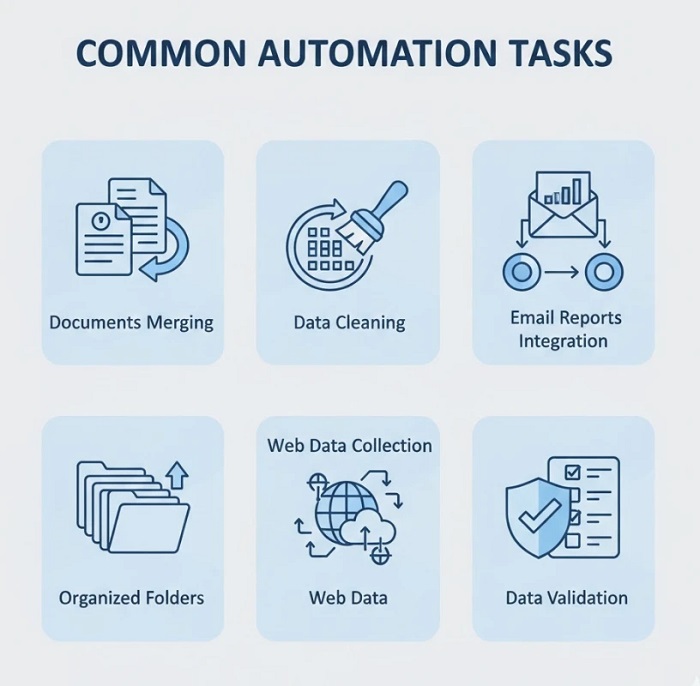
Data automation sounds abstract until you see it in action. “Automate your workflows” means nothing when you’re staring at yet another spreadsheet wondering where to start. What you need are concrete examples — specific tasks that eat your time today that Python can handle tomorrow.
This guide shows seven real data automation tasks, what they involve, and how Python solves them. These aren’t theoretical exercises — they’re the exact problems businesses pay to solve daily. Master even two or three, and you’ve got marketable skills. For a complete learning path covering these techniques, explore this in-depth guide to Python data automation.
Task 1: Monthly Report Consolidation
The manual pain: Every month, you receive sales/inventory/performance reports from multiple sources — regional offices, departments, systems. You open each file, copy relevant data, paste into a master spreadsheet, adjust formulas, verify totals. Two hours minimum, often more when formats don’t match.
The Python solution: A script scans a designated folder, identifies this month’s files by naming pattern, reads each into pandas DataFrames, standardizes column names and formats, combines everything into a single dataset, calculates summary statistics, and exports a formatted report. Runtime: under 60 seconds.
Skills required: File operations with pathlib, pandas basics (read_excel, concat, groupby), Excel export with formatting.
Time saved: 2-4 hours monthly per report type. Organizations with multiple recurring reports save 20+ hours monthly.
Task 2: Data Cleaning and Standardization
The manual pain: Customer data arrives messy. Names in different formats (JOHN SMITH, john smith, Smith, John). Phone numbers with inconsistent formatting. Addresses missing postal codes. Duplicate entries with slight variations. Cleaning a thousand records takes a full day of tedious work.
The Python solution: Build a cleaning pipeline that standardizes text formatting, validates and reformats phone numbers using regex patterns, fills missing values from lookup tables or APIs, identifies duplicates using fuzzy matching, and flags records requiring human review. Process 10,000 records in minutes.
Skills required: String methods, regular expressions, pandas data manipulation, basic fuzzy matching libraries.
Time saved: Hours per dataset. One financial services company reduced customer data cleaning from 3 days to 2 hours.
Task 3: Automated Email Reports
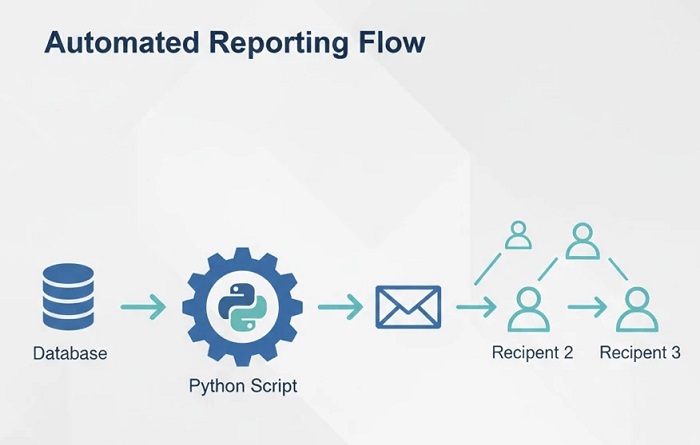
The manual pain: Every Monday morning, you pull data, create a summary, format it nicely, and email it to stakeholders. Miss a week due to vacation or illness, and people notice immediately. The task isn’t hard — it’s the reliability and consistency that’s exhausting.
The Python solution: A scheduled script runs Sunday night, queries your data source, generates summary statistics and visualizations, formats everything into an HTML email or PDF attachment, and sends to the distribution list. You return Monday to replies discussing the report you “sent.”
Skills required: Data aggregation with pandas, basic visualization (matplotlib or plotly), email sending with smtplib, task scheduling.
Time saved: 1-2 hours weekly, plus the mental overhead of remembering to do it. More importantly: perfect reliability without your involvement.
Task 4: Multi-System Data Synchronization
The manual pain: Data lives in multiple systems that don’t talk to each other. Customer updates in CRM need reflecting in the billing system. Inventory changes in the warehouse system need syncing to the e-commerce platform. You’re the human integration layer, manually copying data between systems.
The Python solution: Build integration scripts that connect to each system’s API (or database directly), identify changes since last sync, transform data to match destination formats, push updates, and log everything for audit trails. Run hourly, daily, or on-demand.
Skills required: REST API interactions with requests library, JSON handling, database connections (if needed), error handling and logging.
Time saved: Varies wildly — some organizations save 10+ hours weekly on manual data entry between systems. Error reduction often matters more than time savings.
Task 5: File Organization and Processing
The manual pain: Downloads folder overflowing with files. Invoice PDFs need renaming and sorting by vendor. Images need resizing and organizing by date. Log files need parsing for specific entries. The digital housekeeping never ends.
The Python solution: Scripts that watch folders for new files, automatically rename based on content or metadata, sort into appropriate directories, process as needed (compress images, extract PDF text, parse logs), and archive or delete based on rules.
Skills required: File system operations, working with different file types (PDF, images, text), folder watching with watchdog library, scheduling.
Time saved: 30 minutes to several hours weekly depending on file volume. The real win is never thinking about it again.
Task 6: Web Data Collection
The manual pain: Checking competitor prices daily across multiple sites. Gathering contact information from business directories. Monitoring job postings in your field. Collecting research data scattered across websites. Manual collection is slow and mind-numbing.
The Python solution: Web scraping scripts that visit target pages, extract structured data, handle pagination and dynamic content, respect rate limits and robots.txt, store results in organized formats, and alert you to significant changes.
Skills required: HTTP requests, HTML parsing with BeautifulSoup, handling JavaScript-rendered pages (Selenium for complex cases), data storage, ethical scraping practices.
Time saved: Potentially massive — tasks that would take hours daily become background processes. A real estate analyst automated competitor monitoring that previously took 4 hours daily.
Task 7: Data Validation and Quality Checks
The manual pain: Before using any dataset, you need to verify it’s complete and accurate. Check for missing values, validate formats, ensure values fall within expected ranges, compare against previous periods for anomalies. Skip this and you risk decisions based on bad data.
The Python solution: Validation scripts that run automatically when new data arrives. Check completeness (missing values, expected row counts), validate formats (dates, emails, IDs), flag statistical anomalies (values outside historical norms), compare against business rules, and generate quality reports highlighting issues.
Skills required: Pandas profiling, statistical basics, conditional logic, report generation, alerting for critical issues.
Time saved: 30 minutes to 2 hours per dataset. More importantly: catches data quality issues that manual review often misses.
The Compound Effect of Automation
Individual automations save hours. Combined, they transform how you work:
Monday morning: Weekend data already processed, reports sent, quality issues flagged. You start with insights, not data prep.
Throughout the week: Systems stay synchronized automatically. Files organize themselves. Competitor data updates without your involvement.
Month end: Consolidation reports generate themselves. Reconciliation happens automatically. You review results instead of creating them.
The goal isn’t replacing yourself — it’s elevating your work from data processing to data analysis and decision-making.
Getting Started: Pick One Task
Don’t try automating everything at once. Choose one task from this list — ideally something you do regularly that causes genuine frustration. Learn just enough Python to solve that specific problem. Ship an imperfect solution that works.
Success with one automation builds confidence and skills for the next. Within months, you’ll have a personal toolkit of scripts that handle your recurring data headaches automatically.
The skills overlap significantly. Learn file handling for Task 1, and you’re halfway to Task 5. Master pandas for Task 2, and Tasks 1, 3, and 7 become much easier. Each automation makes the next one faster to build.
From Examples to Expertise
These seven tasks represent the bread and butter of data automation work. Companies hire for exactly these skills — the ability to identify repetitive data processes and build reliable Python solutions.
Ready to build these capabilities systematically? The Python Automation Course teaches the exact skills behind these examples — from pandas fundamentals through complete automation projects you can adapt to your own data challenges.